Your terminal prompt is the one thing you stare at all day as a developer. By default it’s something like C:\Users\you> or user@machine:~$ — functional, but completely silent about everything that actually matters: what branch are you on, did that last command fail, which Node version is active, is the build broken? Oh My Posh fixes all of that, and it looks stunning while doing it.
What Is Oh My Posh?
Oh My Posh is an open-source, cross-platform prompt engine built in Go. Originally inspired by Oh My Zsh and Powerline, it has evolved into a fully independent tool that works on every major shell and operating system — with a single config file that follows you everywhere.
It replaces your static prompt with a dynamic, segment-based display that adapts to context: when you’re in a Git repo it shows branch and status, when you’re in a Node project it shows the runtime version, when a command fails it highlights the exit code. All of it configurable, all of it fast.
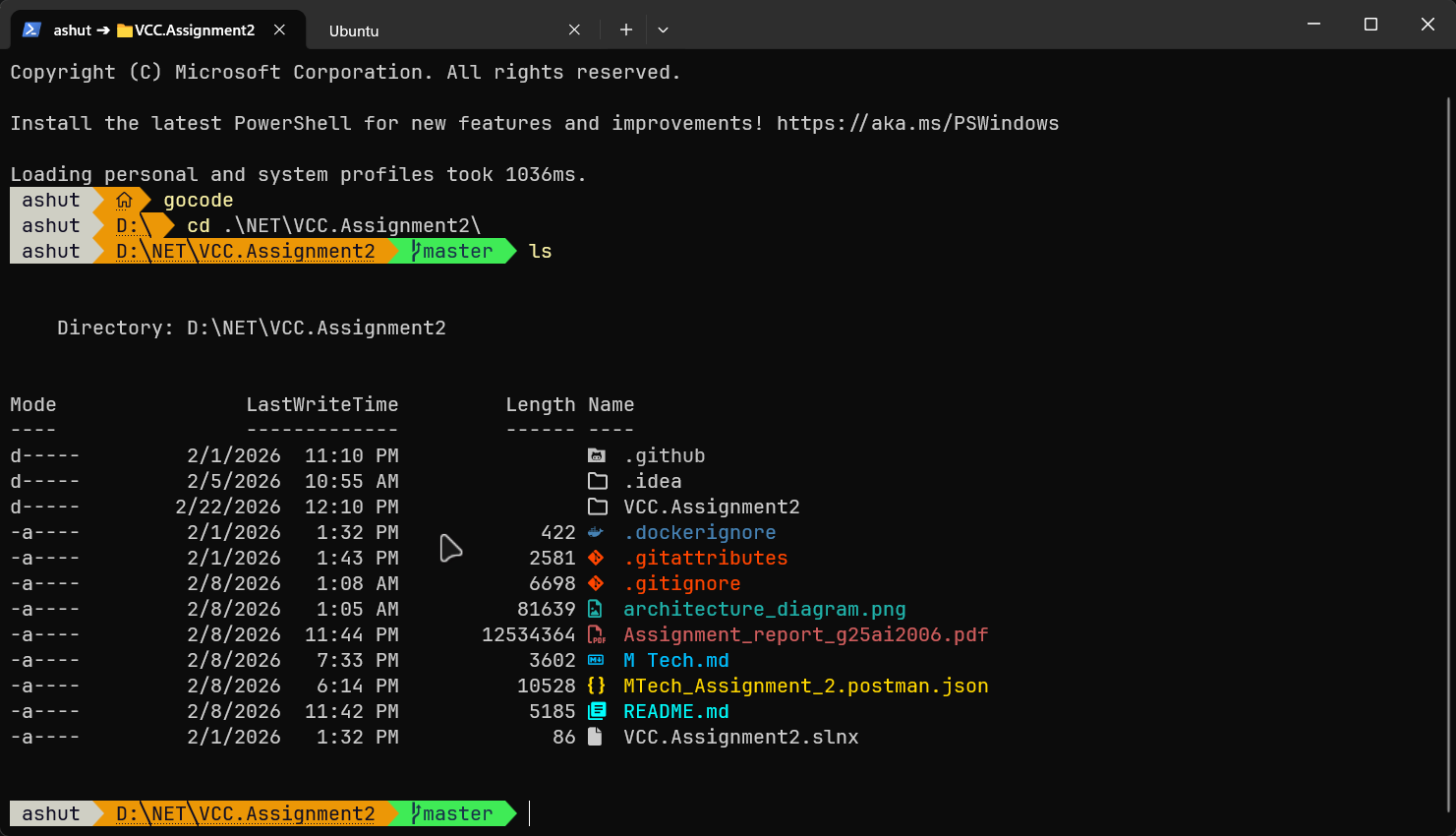
“The most customizable and fastest prompt engine for any shell.”
Key stats:
- 170+ built-in themes
- 180+ available segments
- Works on Windows, macOS, Linux, WSL, SSH, containers
- Supports PowerShell, Bash, Zsh, Fish, Nu Shell, and more
- Built with Go — sub-millisecond rendering via smart caching and async operations
Why Developers Love It
A plain prompt tells you where you are. Oh My Posh tells you what’s happening:
| Without Oh My Posh | With Oh My Posh |
|---|---|
C:\Projects\app> | main ✓ ●2 ✗1 + Node 20.11 + exit 0 |
You cd to check branch | Branch shown inline, always |
You run node -v manually | Runtime version in prompt, automatically |
| Failed command looks the same | Exit code highlighted in red |
| Same prompt everywhere | Context-aware: Git, cloud, battery, time |
For developers specifically:
- Git at a glance — branch name, staged/unstaged changes, commits ahead/behind, stash count. No more running
git statusjust to remember where you are. - Language version awareness — automatically shows Node, Python, Go, Rust, .NET, Ruby, Java versions when you enter a relevant project directory. Switch versions with nvm or pyenv and the prompt updates instantly.
- Command duration — long-running commands show elapsed time. Know immediately if that build took 3s or 3min.
- Exit code visibility — failed commands are visually distinct. Never miss a silent failure again.
- Cloud context — Azure, AWS, and GCP segments show your active subscription or profile.
- Consistent cross-machine — one
.omp.jsonin your dotfiles repo means the same prompt on every machine, every OS.
Installation
Windows (Recommended: Winget)
| |
Alternatively via Chocolatey (community-maintained):
| |
Or the manual PowerShell installer:
| |
macOS
| |
Linux
| |
Verify
| |
Step 1: Install a Nerd Font
Oh My Posh uses glyphs — icons for Git, language logos, arrows, separators — that require a Nerd Font. Without one you’ll see boxes and question marks instead of icons.
Install directly via Oh My Posh:
| |
Then set the font in your terminal:
- Windows Terminal: Settings → Profile → Appearance → Font face →
MesloLGM Nerd Font - VS Code: add
"terminal.integrated.fontFamily": "MesloLGM Nerd Font"tosettings.json
Popular Nerd Fonts: MesloLGM, CaskaydiaCove, FiraCode, JetBrainsMono
Step 2: Configure Your Shell
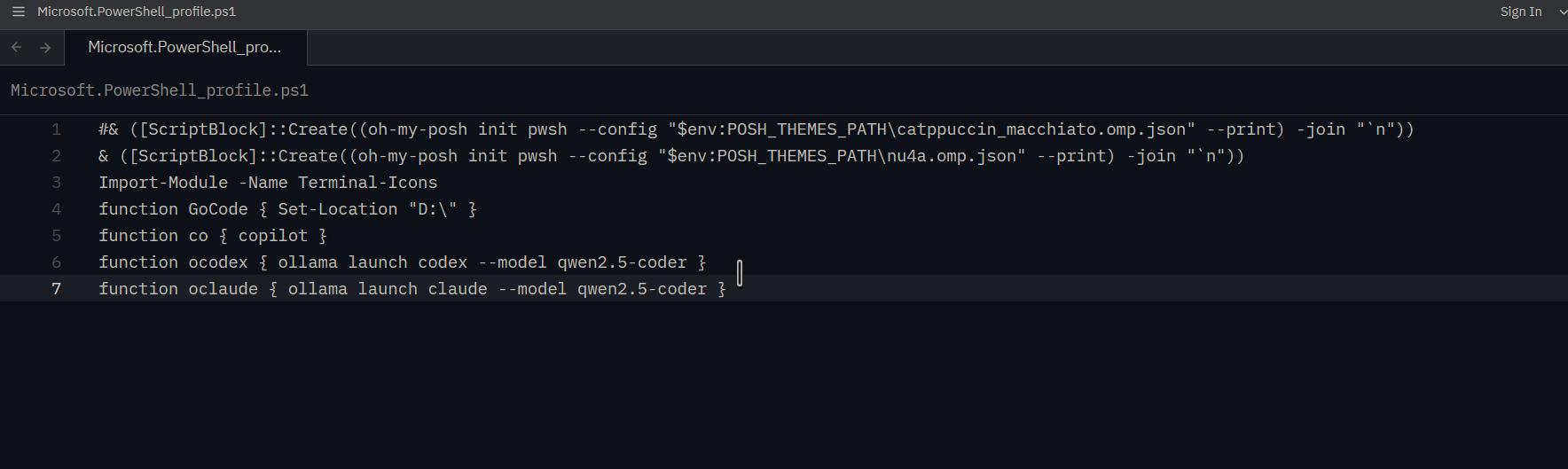
PowerShell
Open your profile:
| |
Add:
| |
Reload:
| |
Bash
Add to ~/.bashrc:
| |
Reload:
| |
Zsh
Add to ~/.zshrc:
| |
Fish
Add to ~/.config/fish/config.fish:
| |
Step 3: Choose a Theme
Oh My Posh ships with 170+ themes out of the box. Preview them all in the terminal:
| |
This cycles through every theme applied to your actual prompt. Pick one you like, then set it in your profile:
| |
Popular themes:
| Theme | Style |
|---|---|
jandedobbeleer | Default — colorful, multi-segment |
powerlevel10k_rainbow | Rainbow blocks, detailed info |
catppuccin | Soft pastel tones |
dracula | Dark, purple-accented |
pure | Minimal single-line |
agnoster | Classic Powerline style |
night-owl | Dark blue, high contrast |
cobalt2 | Cobalt blue, clean |
clean-detailed | Minimal but informative |
Themes live in $env:POSH_THEMES_PATH on Windows and $(brew --prefix oh-my-posh)/themes on macOS.
Segments: What Your Prompt Can Show
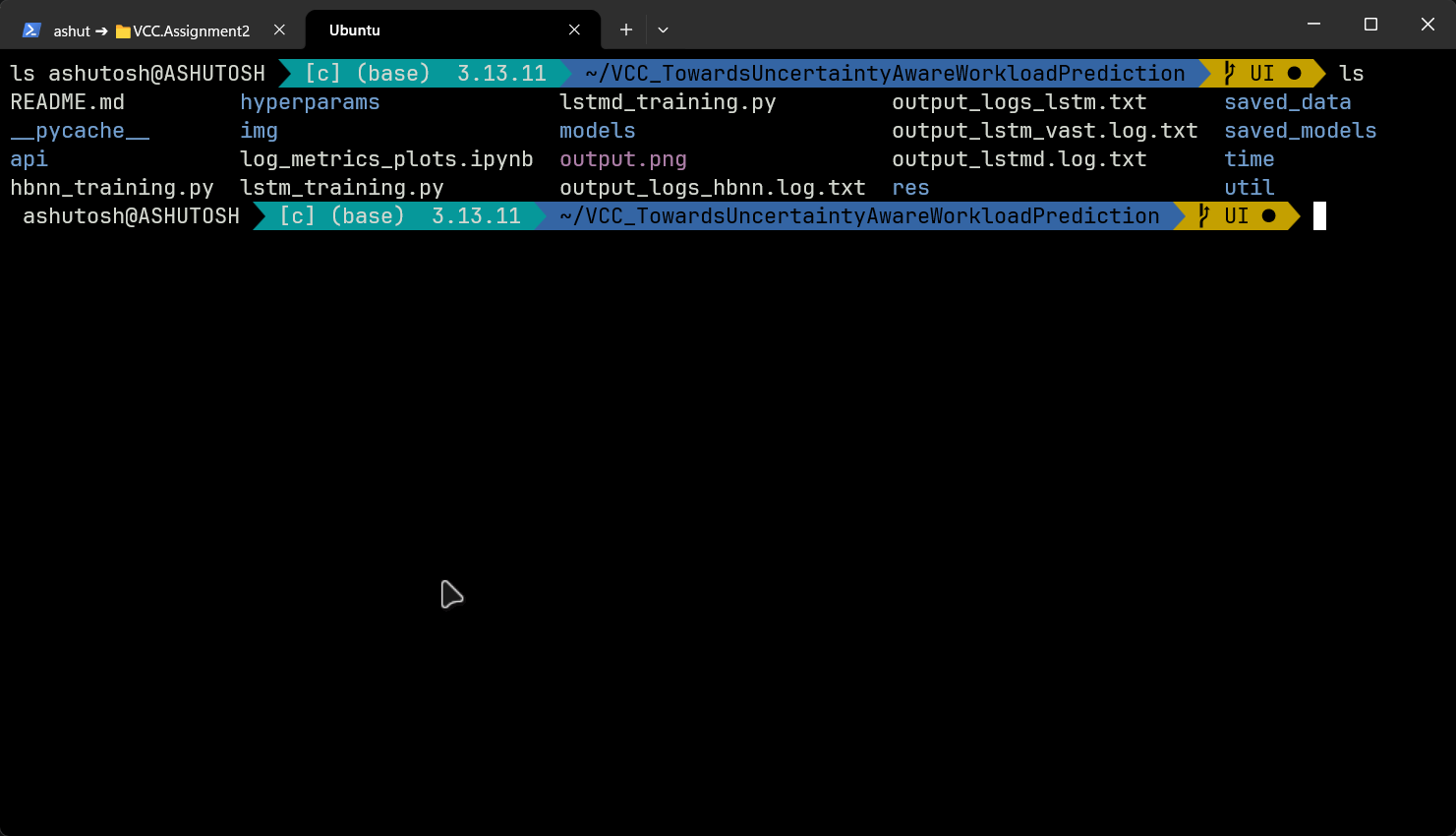
Segments are the building blocks of an Oh My Posh prompt. Each one displays a single category of information and appears only when relevant — Node version shows up inside a Node project, Git status shows up inside a repo. There are 180+ segments available.
Developer Essentials
| Segment | What It Shows |
|---|---|
git | Branch, staged/unstaged count, commits ahead/behind, stash, upstream |
node | Node.js version (when package.json is present) |
python | Python version + active virtualenv name |
go | Go version (when go.mod is present) |
rust | Rust toolchain version (when Cargo.toml is present) |
dotnet | .NET SDK version (when .csproj or .sln is present) |
java | Java version (when pom.xml or build.gradle is present) |
ruby | Ruby version (when Gemfile is present) |
php | PHP version (when composer.json is present) |
System & Context
| Segment | What It Shows |
|---|---|
path | Current directory with smart shortening |
exit | Last command exit code + status icon |
executiontime | Duration of the last command (above configurable threshold) |
time | Current time |
battery | Battery level + charging status |
os | OS logo icon |
root | Highlights when running as admin/root |
shell | Active shell name |
Cloud & DevOps
| Segment | What It Shows |
|---|---|
az | Active Azure subscription |
aws | Active AWS profile + region |
gcp | Active GCP project |
kubectl | Active Kubernetes context + namespace |
docker | Active Docker context |
terraform | Active Terraform workspace |
pulumi | Active Pulumi stack |
Fun & Utility
| Segment | What It Shows |
|---|---|
sysinfo | CPU and RAM usage |
spotify | Currently playing track |
wakatime | Coding activity stats |
github | GitHub notification count |
weather | Local weather conditions |
Customization: Building Your Own Theme
Themes are JSON (also supports TOML and YAML) config files. Here’s a minimal custom config — a two-line prompt showing path, Git branch, and Node version:
| |
Save as ~/.config/omp.json, then point your shell init at it:
| |
The $schema line enables IntelliSense in VS Code when editing the config — every property is documented inline as you type.
Keeping Oh My Posh Updated
| |
Tips
- Start with a built-in theme — run
Get-PoshThemes, pick one, copy its file from$env:POSH_THEMES_PATH, then edit it as your own baseline. - Slow Git repos — large monorepos can make the Git segment sluggish. Set
"fetch_status": falseto keep branch display but skip status counting. - Dotfiles — commit your
.omp.jsonto a dotfiles repo. Symlink it on every machine so every update propagates everywhere. - VS Code terminal — set
"terminal.integrated.fontFamily"to your Nerd Font or icons won’t render inside the editor. - WSL — install Oh My Posh separately inside WSL using the Linux installer. Don’t reuse the Windows binary across the boundary.
oh-my-posh get shell— run this if Oh My Posh isn’t initializing correctly; confirms which shell it detected.
Conclusion
Oh My Posh seems like a cosmetic upgrade until you’ve used it for a week — then you can’t imagine working without it. The Git segment alone eliminates dozens of manual status checks per day. Language version awareness prevents the classic “why isn’t this running” moment caused by a wrong runtime. And the command duration display quietly trains you to notice which operations are actually slow.
It’s free, open-source, cross-platform, and installs in under two minutes. Your terminal is where you live as a developer — it should work as hard as you do.
| |